

Let’s assume you’ve purchased the cheapest possible VPS, equipped with only an IPv4 address.
I personally prefer Debian 13, so we’ll use that platform for our exercise.
You will need to have the iptables package installed for everything to function correctly; you can verify this by running
service netfilter-persistent restart.
Times are tough these days, and an increasing number of resources—including those required for system updates and server operations—now demand IPv6 connectivity.
We are now going to provision an IPv6 address using NAT66, a WireGuard tunnel, and an OpenWrt router—specifically, one where you already have native IPv6 connectivity provided by your ISP. In short, we’re going to give our VPS a major upgrade.
- The VPS will act as the WireGuard server.
- The router (running OpenWrt 24.10.x) will act as the WireGuard client, it uses the internal IP range 192.168.13.x/24.
- The WG tunnel will use the IP range 192.168.195.x/24 (192.168.195.1 for the VPS, 192.168.195.2 for OpenWrt).
- The IPv6 addresses for the tunnel will be fd04:9::1/64 for the VPS and fd04:9::2/64 for OpenWrt.
Let’s begin with the VPS configuration.
(Note: ens3 is the name of your VPS’s network interface)
cat wg0.conf
[Interface]
Address = 192.168.195.1/24
Address = fd04:9::1/64
Table = off
SaveConfig = true
PostUp = iptables -t nat -A POSTROUTING -o ens3 -j MASQUERADE; route add -net 192.168.13.0/24 gw 192.168.195.2
PostDown = iptables -t nat -D POSTROUTING -o ens3 -j MASQUERADE; route del -net 192.168.13.0/24 gw 192.168.195.2
ListenPort = 443
PrivateKey = privatekeyWG=
[Peer]
PublicKey = secretkeyWG=
AllowedIPs = 0.0.0.0/0, ::/0
cat /etc/iptables/rules.v4
*filter
:INPUT ACCEPT [0:0]
:FORWARD ACCEPT [0:0]
:OUTPUT ACCEPT [0:0]
-A INPUT -m state –state RELATED,ESTABLISHED -j ACCEPT
-A INPUT -p icmp -j ACCEPT
-A INPUT -i lo -j ACCEPT
-A INPUT -i wg0 -j ACCEPT
-A INPUT -p udp -m udp –dport 443 -j ACCEPT
-A INPUT -p tcp -m state –state NEW -m tcp –dport 22 -j ACCEPT
-A INPUT -p udp -m udp –dport 67 -j ACCEPT
-A INPUT -p udp -m udp –dport 68 -j ACCEPT
-A INPUT -j REJECT –reject-with icmp-host-prohibited
-A FORWARD -i wg0 -j ACCEPT
-A FORWARD -o wg0 -j ACCEPT
-A FORWARD -j REJECT –reject-with icmp-host-prohibited
COMMIT
*nat
:PREROUTING ACCEPT [0:0]
:INPUT ACCEPT [0:0]
:OUTPUT ACCEPT [0:0]
:POSTROUTING ACCEPT [0:0]
COMMIT
cat /etc/iptables/rules.v6
*filter
:INPUT ACCEPT [0:0]
:FORWARD ACCEPT [0:0]
:OUTPUT ACCEPT [0:0]
-A INPUT -m conntrack –ctstate RELATED,ESTABLISHED -j ACCEPT
-A INPUT -p ipv6-icmp -j ACCEPT
-A INPUT -i lo -j ACCEPT
-A INPUT -i wg0 -j ACCEPT
-A FORWARD -i wg0 -j ACCEPT
-A FORWARD -o wg0 -j ACCEPT
COMMIT
OpenWrt Configuration Screenshots
Creating a Standard WireGuard Network Adapter on OpenWrt

In the firewall rules, create a separate rule for this interface.
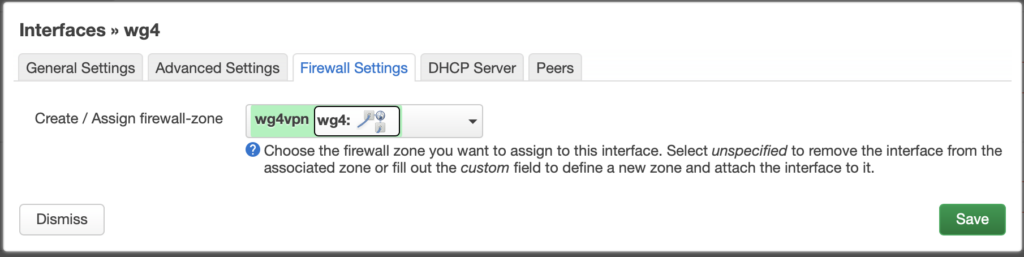
In the peer section, specify the connection destination, along with the necessary connection keys.
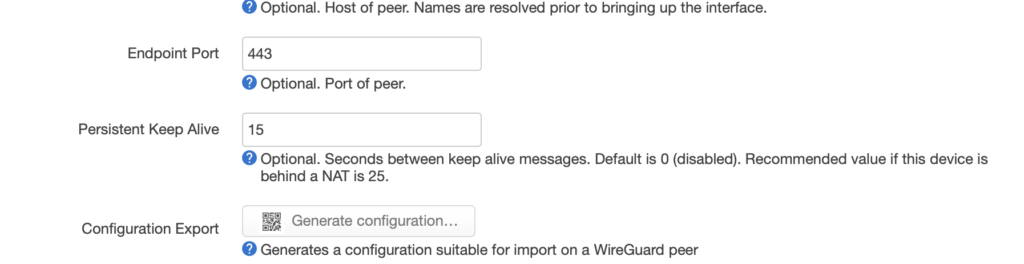
And then…

Go to the firewall settings and configure the settings for the new rule.

Don’t forget to check the Masquerading boxes in two places.
In the “Allow forward from source zones” list, select all of your internal LAN interfaces from which you want traffic to be able to reach the VPS.
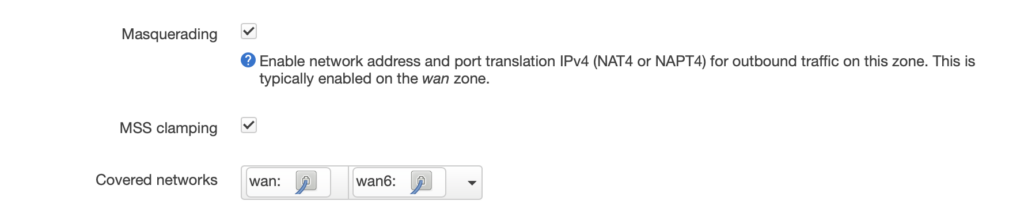
and in Advanced
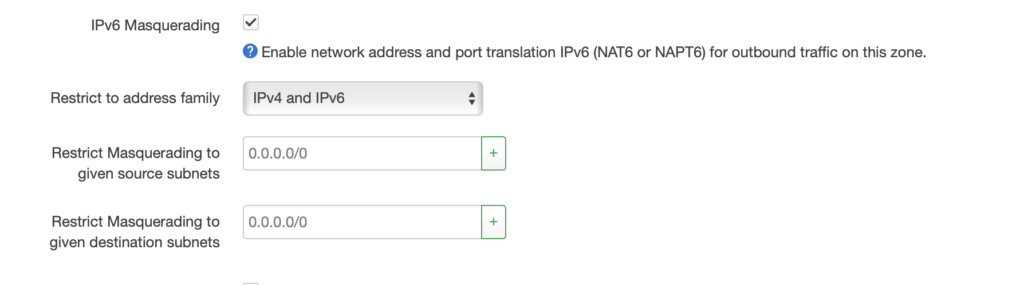
Now, navigate to the router’s wan6 interface and uncheck the “Source Routing” option; otherwise, the network we created for the wg interface will be completely ignored.
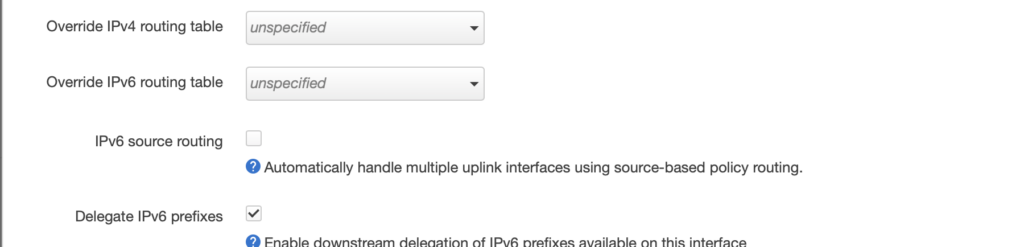
Verification from the VPS side:
Once the tunnel is established, pings should work in both directions:
ping 192.168.195.2
ping6 fd04:9::2
Now, you need to add routing for all IPv6 traffic through the tunnel:
ip -6 route add default dev wg0
Check the IPv6 routing table:
route -6
If the default route appears as follows:
[::]/0 [::] !n -1 1 0 lo
then routing is not enabled; the correct configuration should look like this:
[::]/0 [::] U 1024 1 0 wg0
If everything is working correctly, add the routing rule to the wg0.conf configuration file, specifically within the interface startup commands ( PostUp= ….; ip -6 route add default dev wg0 ) .
To verify that routing is working, run the following command from your VPS:
ping6 ya.ru
(Don’t forget: on OpenWrt, you must have the packages for nat66—NAT for IPv6—installed.)